Search other websites to solve your problem

Monday, September 3, 2012

Time Machine Back To The Past

Google Beta 1998
Screenshot of Google Beta! You can spend hours of searching old websites.You can browse through over 150 billion web pages archived from 1996 to a few months ago, isnt that great?
 
To start surfing the Wayback, type in the web address of a site or page where you would like to start, and press enter. Then select from the archived dates available. The resulting pages point to other archived pages at as close a date as possible. Keyword searching is not currently supported.
Blogger OCTOBER/12/1999
Screenshot of Blogger date 1999.
 

iPhone 5 is Here


The iPhone 5 is expected to be unveiled next week. Rumors claim Apple has completely redesigned its iconic headphones for the first time since 2006. Vietnamese blog site Tinhte.vn posted a video of what it claims are newly-designed headphones for the next iPhone, which is expected to launch on September 12.

If confirmed, it is the first major redesign of the distinctive white headphones since the iPhone launched, other than the addition of an in-line microphone and remote control in 2008.


Saturday, September 1, 2012

WolframAlpha Its Smarter Than You Think


image
Wolphram Alpha

Want to know how many photos, links and updates you posted? Wolfram's got all that. What time of day you post the most? Wolfram will tell you. Just type “Facebook Report” and follow instructions. After connecting it to your Facebook and granting it a rather large number of permissions, Wolfram Alpha will break down everything about your Facebook activity into 60 different sections of charts, graphs, and other analyses

Wolfram Alpha its not like any search engine, it’s a computational search engine. You can ask “how much iron in 1 cup fresh orange juice?”


Wednesday, August 29, 2012

Samsung Galaxy Note II


image
Samsun Galaxy Note II

 The Samsung Galaxy Note II is built around a 5.5" Super AMOLED screen of 1280 x 720 resolution (down from the 1280 x 800 resolution of the original Note). The Exynos 4 Quad chipset has its quad-core CPU clocked at 1.6GHz, coupled with 2 GB of RAM and a beefy 3,100 mAh battery on board. The Note II is actually thinner than its predecessor at 9.4 mm (the Galaxy Note is 9.65 mm thick) and just 2 grams heavier, at 180 grams. There's an 8 MP camera on the back and a 1.9 MP one on the front.


The S-Pen has been redesigned too - it's longer and thicker making it more ergonomic and has learned some cool new tricks. One of them is dubbed Air View, which allows you to hover the S Pen over an email, the gallery, video, etc. to preview the content without the need to actually open the app. In addition, the S Pen is capable of a new gesture called Quick Command, which lets users quickly activate frequently used apps.

The Samsung Galaxy Note II will come with support for both HSPA+ and 4G LTE. It will have 16 GB, 32 GB and 64 GB storage options with a microSD card slot available on each of them.The Samsung Galaxy Note II will ship in Europe this October with US and worldwide availability to follow shortly afterwards. Unfortunately, the pricing is yet to be revealed.


Source

Samsung ATIV S The First Official Windows Phone 8 Smartphone


image
Samsung ATIV

 
 The ATIV S is built around a 4.8-inch Super AMOLED display of HD resolution and has Gorilla Glass 2 on top for extra protection. Powering the smartphone is a 1.5GHz dual-core Qualcomm Krait processor and 1GB of RAM. At the back, there’s an 8MP camera with 1.9MP snapper at the front.

 Measuring 137.2 mm x 70.5 mm x 8.7 mm the Samsung ATIV S weighs 135 grams and packs a beefy 2,300mAh battery. Connectivity options include Wi-Fi 802.11 a/b/g/n, Bluetooth 3 and NFC. Windows Phone 8 supports memory expansion slots and the Samsung ATIV S makes use of that, bringing a microSD card slot to allow expansion of its 16GB or 32GB built-in storage.

 Pricing and availability is yet to be confirmed, but we're guessing the smartphone will hit the shelves immediately after Microsoft officially releases the Windows Phone 8 OS.
Making the Samsung ATIV S company are three new Windows 8-powered tablets – the 10.1” ATIV Tab, and two 11.6” ATIV Smart PC and ATIV Smart PC Pro.

Monday, August 27, 2012

How Can I Install IOS 6 Beta For iPhone, iPad, iPod?

image
iOs 6
Before you can install iOS 6 beta you’ll need get an iOS developer account. You can use who has an iOS developer account. The iOS developer account costs $99 per year for individuals.
If you install iOS beta you’ll have some bugs, horrible battery life and is hard to revert your to iOS 5.
  1. You’ll need latest iTunes.
  2. Backup your device using latest iTunes. Make also local backup.
  3. Once the backup is complete, hold down Option on your keyboard and click Restore.
  4. Select the matching IPSW file for the device you are loading iOS 6 on.
  5. iTunes will install it on your iOS device. Installation should take about 10 minutes.
  6. After the installation is finished, restore your device from the backup you created in step 1.
  7. For help visit Apple Developer Forum

Thursday, August 23, 2012

How Can I Jailbreak My iPhone, iPad, iPod?


iph
Jailbreak


iPhone Dev team has released Redsn0w that includes support for untethered iOS 5.1.1 for iPhone, iPad and iPod touch. It includes Rocky Racoon and untethered iOS 5.1.1 jailbreak developed by pod2g and planetbeing that was used in Absinthe 2.0.x jailbreak.
In this article, we will take you through the step-by-step procedure to jailbreak your iPhone on iOS 5.1.1 using Redsn0w for both Mac and Windows users.

Here are some important points to note before you proceed.

  • This tutorial is meant for iPhone users. iPad users can check out this tutorial, while iPod touch users can check out this tutorial.
  • Redsn0w 0.9.12b2 supports untethered jailbreak.
  • Redsn0w 0.9.12b2 supports iPhone 4S, iPhone 4, iPhone 3GS running on iOS 5.1.1.
  • Please ensure your iPhone is on iOS 5.1.1 (Settings --> General --> About --> Version should be 5.1.1) before proceeding.
  • Please note that jailbreaking your iPhone may void your warranty and hence proceed with caution and at your own risk.
  • Please do not forget to backup your iPhone before you proceed.
  • Please ensure you are running latest version of iTunes.
  • Important: iPhone 4, iPhone 3GS users who have a lot of media on your device, then you can jailbreak your iOS device by putting it in DFU mode (we'll update this guide with additional instructions for it shortly).

How do I set up Firefox Sync?


fire sync

Firefox Sync


When you set up Firefox Sync on your computer, all of your data and preferences (such as your bookmarks, history, passwords, open tabs and installed add-ons) gets stored securely on the Mozilla servers. Then you can connect other devices (a mobile phone for example) and they will be automatically synchronized, giving you access to all of your information no matter where you are. This article will walk you though setting up Firefox Sync for the first time.

Wednesday, August 22, 2012

How Can I Store My Bookmarks Online?

bookmark
Online Bookmarks
You can always lose your bookmarks. If you format your computer or your computer crashes you will lose your bookmarks. So there is a solution. First you have to install Chrome. There is alternatives like Firefox Sync.
With Chrome's sign-in feature, you no longer need to fret about your bookmarks or apps being "stuck" on one computer. When you sign in to the Chrome browser or a Chrome device, your bookmarks, extensions, apps, theme, and other browser preferences are saved and synced to your Google Account. You can then load these settings anytime you use Chrome on other computers and devices.


How Can I Find My Iphone?

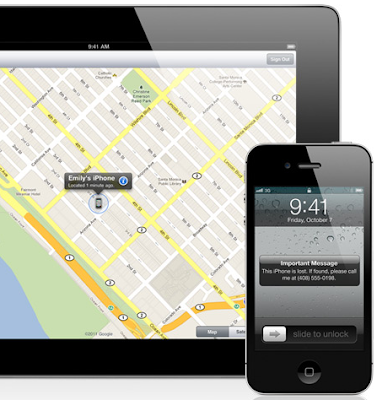
Find your iPhone


 Have you ever lost your iPhone? You take your iPhone everywhere. Which means you might leave it anywhere. Whether it’s at the office in a conference room or under a pillow on your couch, chances are it won’t be lost for long.

Locate your iPhone on a map.

People misplace things all the time. Fortunately, if you lose your iPhone, Find My iPhone can help. Go to Settings, tap iCloud, and enable Find My iPhone. Then if you misplace your iPhone, you can sign in to icloud.com from any computer web browser or use the Find My iPhone app on another iPhone, iPad, or iPod touch to display its approximate location on a map. It’s easy to activate this feature on your iPhone. All it takes is a few easy steps.
Learn how to set up Find My iPhone


Display a message or play a sound to help you find it.

Say you’ve just used Find My iPhone, and it turns out you left your iPhone at the doctor’s office. You can write a message and display it on your screen. Something like, “Oops, left my iPhone behind. Please call me at 408-555-0198.” Your message appears, even if the screen is locked. And if the map shows that your iPhone is nearby — perhaps in your office under a pile of papers — yet you still can’t find it, you can tell Find My iPhone to play a sound that overrides the volume or silent setting.


Set a passcode lock remotely.

If you realize that you left your iPhone in a public place, you may want to protect its contents until it’s safely back in your hands. Remotely set a four-digit passcode lock to prevent people from using your iPhone, accessing your personal information, or tampering with your settings.


Protect your privacy with Remote Wipe.

Addresses, phone numbers, email, photos. Your iPhone contains important and personal information — information you probably don’t want in the hands of a stranger. So if you lose your iPhone and displaying a message on it hasn’t resulted in its safe return, you can initiate a remote wipe to restore it to its factory settings. When you eventually find your iPhone, you can restore the data using your most recent backup from iCloud or iTunes.


Find My iPhone app.

Because the unexpected happens in the most unexpected places, the Find My iPhone app can help you locate your missing iPhone even when you don’t have access to a computer. It’s free on the App Store and available to anyone. So if you misplace your device, download the Find My iPhone app on a friend’s iPhone, iPad, or iPod touch and sign in to find your iPhone.
Get the Find My iPhone app